By invitation
The Platform · the lead finder

Leadsteer finds your next customers and writes the first email.

Paste your website. Leadsteer reads it, works out who buys from you, finds the decision makers at those companies and writes a first email to each one. You get a review window on the list and the email before anything is sent. If you only want the leads, you can see the list and buy the ones you want.

Agentic AI for the wellbeing industry

The agents find and write. You get a review window first.

Leadsteer runs on four agents. They read your website, find buyers, write the first emails and draft your replies. You correct the profile, pick the buyer groups and set the sending days and hours. Every list and every reply gives you a review window first.

The research agent reads your site

It reads your home page and product pages, then writes a short profile of what you sell, who buys it and who you compete with. You can correct it.

The buyer agent finds who buys

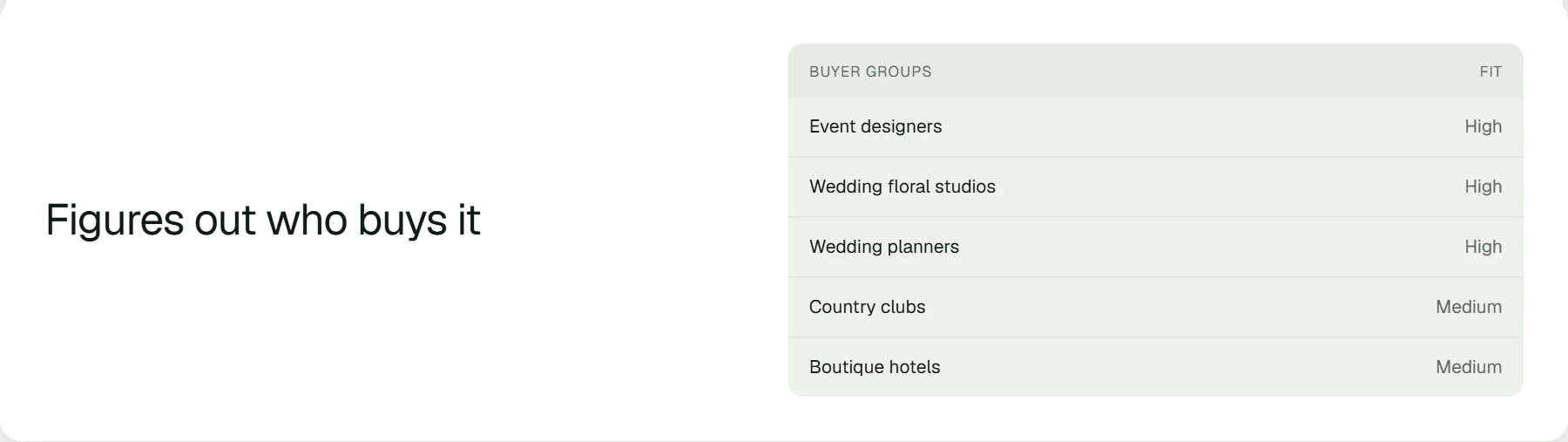
It splits your market into buyer groups, each with a fit rating. Each company’s own website is read before it goes on your list. You choose which groups to run.

The outreach agent writes first emails

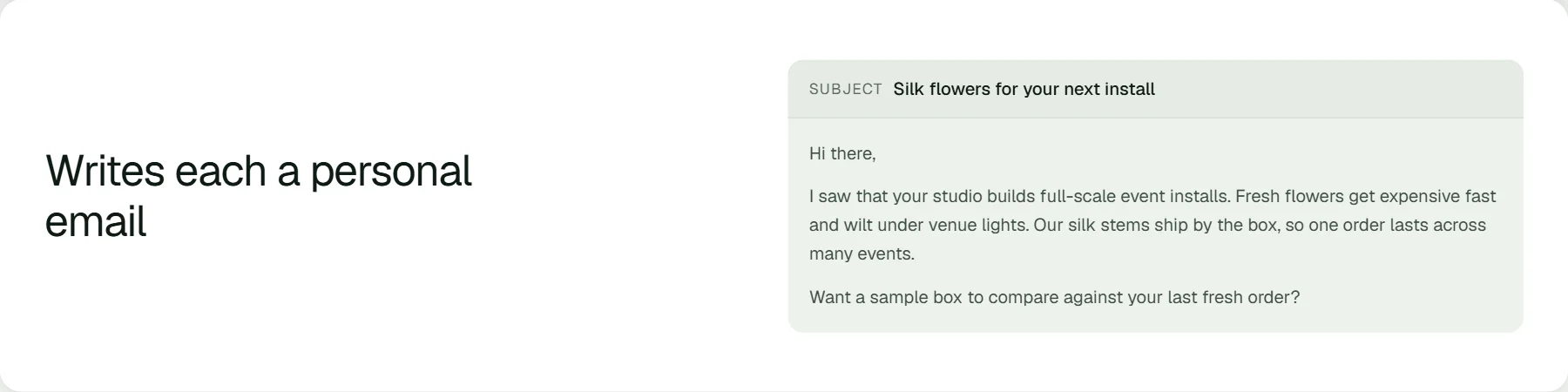
Each email draws on your website and theirs, follows your instructions and is written in the reader’s language. You get a review window on the list and the wording before the campaign starts.

The reply agent drafts answers

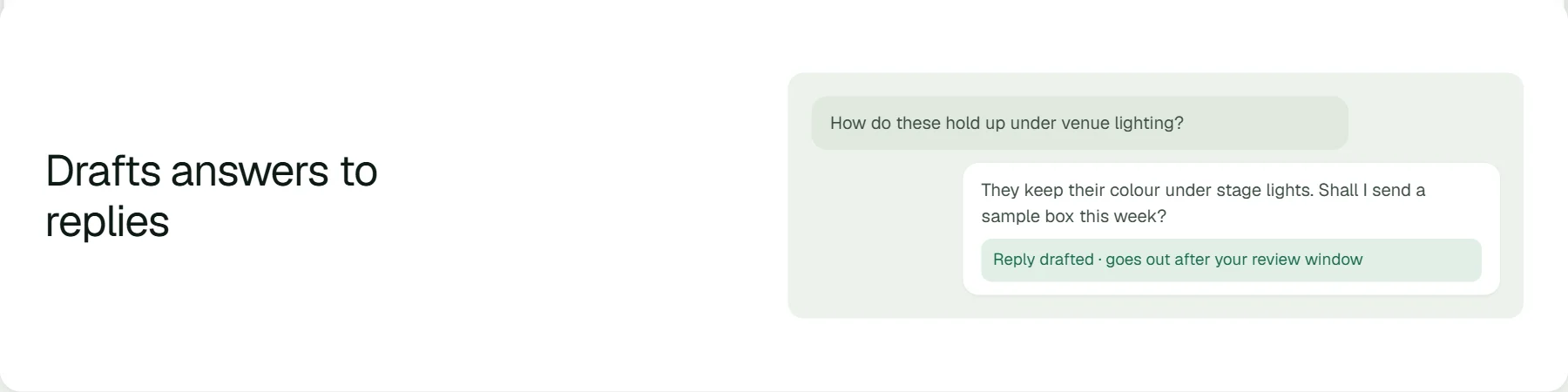
When a lead answers, it drafts your reply, and people who show real interest are marked for you. The draft waits for your review window before it goes out.

See what every agent does → How this is different →

Two ways to use it

Two ways to use Leadsteer. Let it reach out, or just take the leads.

What is inside

Seven tools, each with the real screen beside it

What each one does, in plain words. The example screens use a made-up silk flower wholesaler. The others are from a real project with the names hidden.

Company research

Starts from your website

It reads your website and writes down what you sell.

  • Paste one linkYou give it your website. There is no long form to fill in.
  • It reads your pagesThe home page and the product pages are read, the way a new salesperson would read them.
  • It sums you upWhat you sell, who you sell to and who you compete with, in a short profile you can correct.

Leadsteer reading a website and writing the company profile
The research step, shown on the example of a silk flower wholesaler.

Buyer groups

Who is most likely to buy

It splits the market into the groups that need what you sell.

  • Groups by needEach group is a kind of company with a reason to buy from you.
  • A fit rating on eachHigh, medium or low, so you know where to start.
  • One campaign per groupEach group becomes its own campaign, with its own list and its own emails.
A list of buyer groups with a fit rating beside each
Buyer groups for the same example, each with a fit rating.

Decision makers

The person to write to

At each company it finds the person who decides, with an email address that checks out.

  • The owner or the right team leadIt looks for the person who can say yes, not a general inbox.
  • Tied to a sourceA person stays on the list only when a source connects them to that company.
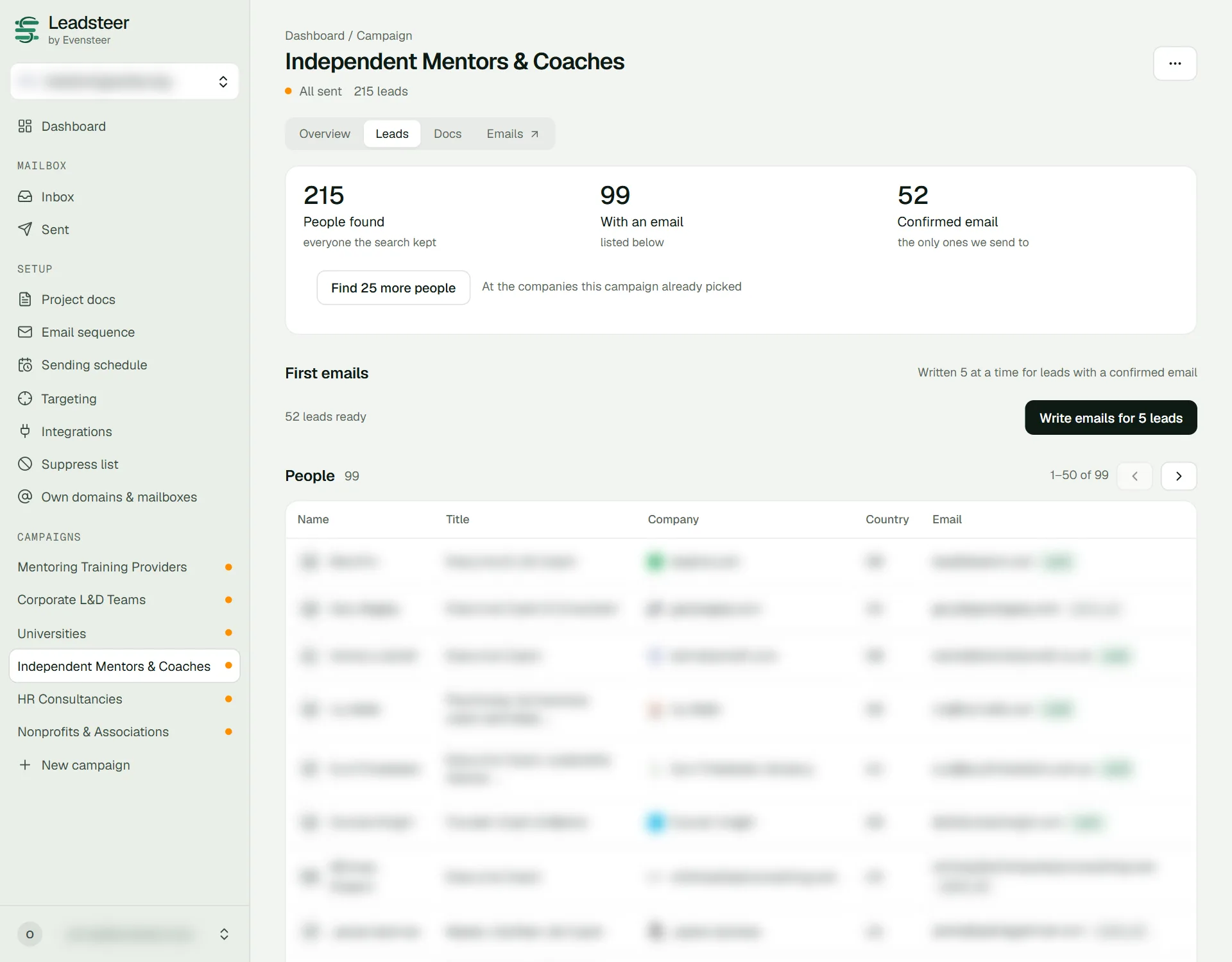
  • Three honest countsPeople found, people with an email, and people with a confirmed email. Only the confirmed ones are written to.
  • Find more when you need themOne button looks for more people at the companies the campaign already picked.
A Leadsteer campaign showing people found, people with an email and people with a confirmed email
A real campaign. 215 people found, 52 with a confirmed email. Names are hidden here.

Outreach agent

The first email

It writes a first email to each person, from your website and theirs.

  • Written for that companyEach email starts from what the company does and why your offer fits it.
  • Your instructionsTell it what the email should say, offer or avoid, or paste your own copy.
  • Their languageEmails can go out in the language of the person receiving them.
  • Follow-upsLater emails are set up the same way, so nobody is chased by hand.
A first email written by Leadsteer for one company
A first email from the same example.

Reply drafts

When someone answers

When a lead replies, Leadsteer drafts your answer.

  • A draft, not a sent emailThe reply waits for your review window before it goes out.
  • One inboxReplies from every campaign arrive in one place.
  • Hot leads markedPeople who show real interest are counted on your dashboard.
A reply from a lead and the answer Leadsteer drafted
A question from a lead, and the drafted answer waiting for review.

Dashboard

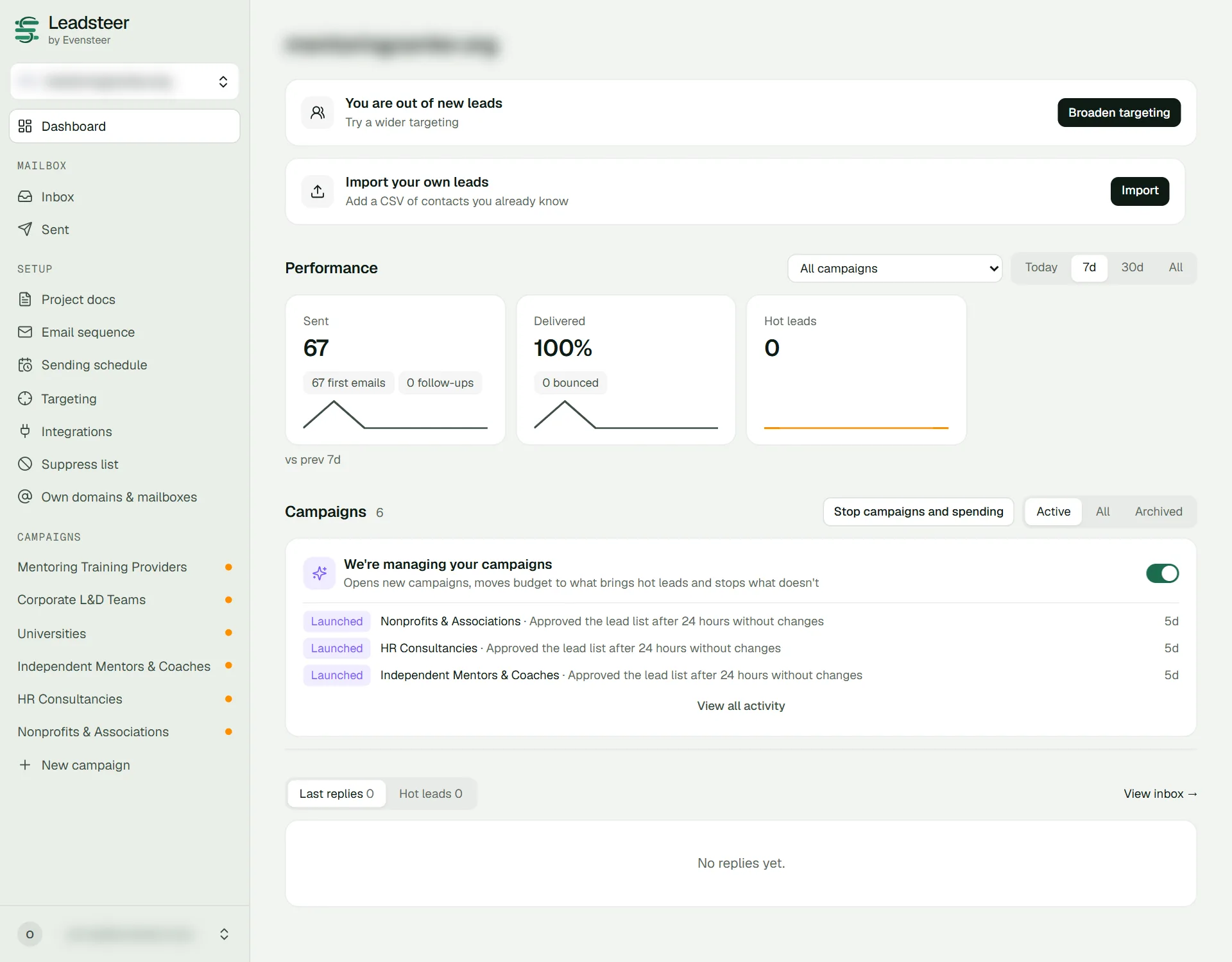
What happened this week

See what was sent, what arrived and who answered.

  • Sent, delivered, hot leadsThree numbers for the period you pick, for one campaign or all of them.
  • Each campaign in stepsPlanning the search, finding companies, finding decision makers, checking the list.
  • It can manage the campaignsLeadsteer can open new campaigns, favour the ones that bring hot leads and stop the ones that do not. You can switch that off.
  • Bring your own listImport contacts you already know and write to them the same way.
The Leadsteer dashboard with sent, delivered and hot lead counts and a list of campaigns
The dashboard of a real project. The project name is hidden.

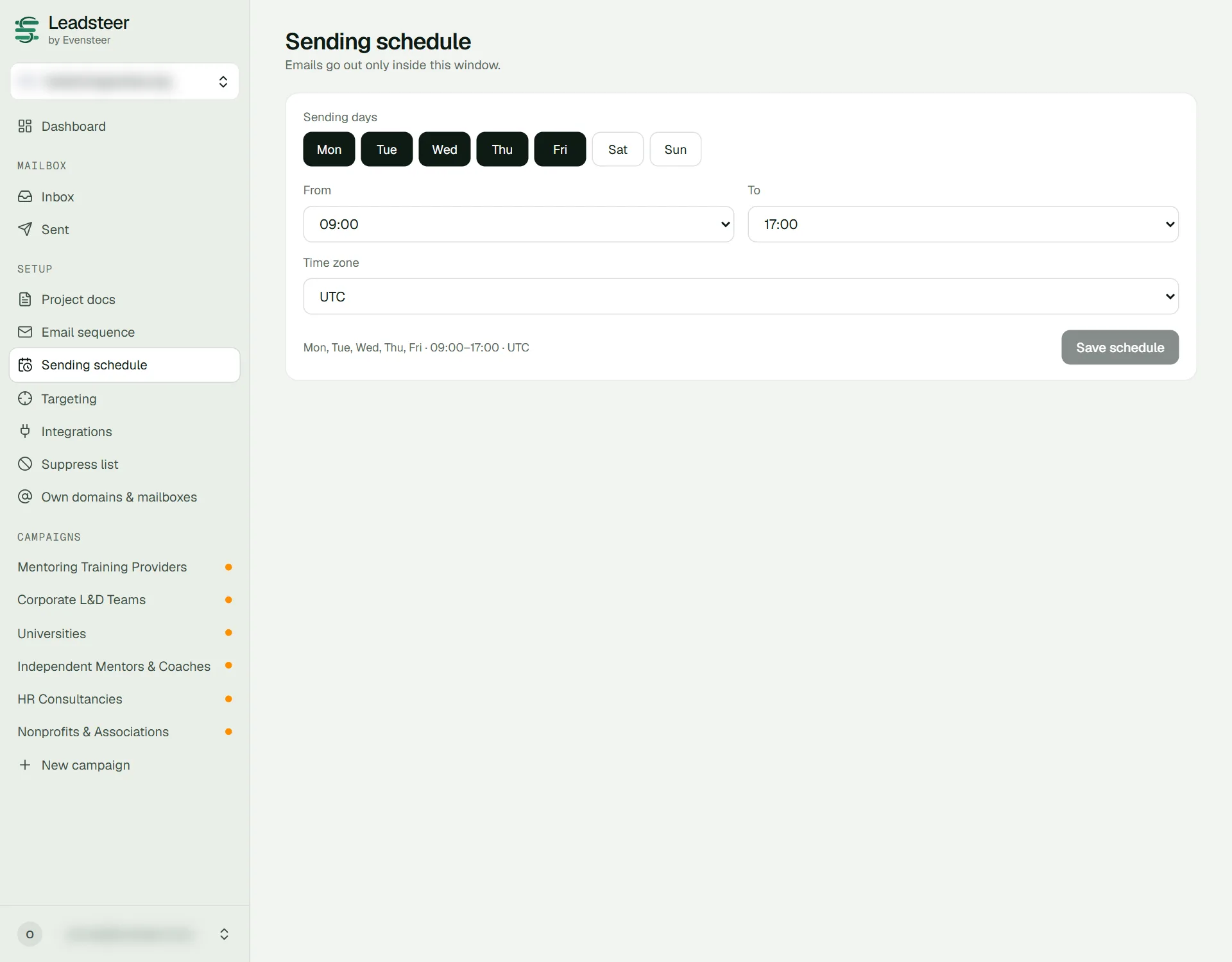
Sending schedule

Protects your address

Emails go out only inside the window you set.

  • Days and hoursPick the days and the working hours, in your time zone.
  • A list of people never to write toAdd anyone to the suppress list and no campaign will contact them.
  • Your own domains and mailboxesSend from addresses you own, each with its own daily limit.
The Leadsteer sending schedule with days, hours and time zone
Days, hours and time zone for sending.
On every run

Three checks before a name reaches your list

Every company is read

Each company’s own website is read before it goes on your list, so the list is not built from a keyword match alone.

Every contact is tied to a source

A person stays on the list only when a source connects them to that company.

Every email is written from both sides

The first email draws on what you sell and on what that company does.

Sending

Built to protect the name you send from

Cold email only works while your address is trusted. Leadsteer has the limits built in.

A setup check first

Sending does not start until the records that prove your domain is yours are in place.

Daily limits per mailbox

Each mailbox has a cap, and emails go out in the working hours of the person receiving them.

A brake on bounces

If too many emails bounce, sending pauses before your address is harmed.

A way out in every email

Every email carries an unsubscribe link, and a person who uses it is never written to again.

Who runs it

Use it yourself, or have us run it

By invitation

You use it

You log in, paste your website, review the buyer groups and the emails, and press start. Leadsteer’s AI does the searching and the writing.

Monthly

We run it for you

With our lead generation service, a specialist runs the search, checks the list and the wording, and you approve before anything is sent.

See lead generation →
Getting in

How you get Leadsteer

Leadsteer is not open to the public. Like Evensteer Desk, it is by invitation.

  1. Send an enquiryTell us what you sell, who you want to reach, and whether you want the outreach or only the leads.
  2. Talk with our teamA short consultation about how you find customers today.
  3. We check the fitIf Leadsteer suits your work, the team sends your invite.
Leadsteer · by invitation

See it work on your own website.

Ask for an invite

One person replies within one working day. Meet Evolution, for your marketing plan →